

Reaching a Global Audience: Mastering Multilingual Website Creation with Nuxt.js
- By Hemanshu Vadoariya
- 09-10-2024
- Technology
What is Nuxt.js?
Nuxt. is the only progressive framework for js, based on the . Vue.js library, which is meant to help you build performant and production-ready web applications. It also makes your Vue much easier to develop because it quickly and definitively lays out an architectural opinion on how things should be built. js applications. Nuxt.js provides useful features including server-side rendering (SSR), static site generation (SSG), and a flexible module system to extend your application. With Nuxt. Js that allow you to concentrate on your application logic and handle all the setup/configuration complexity with just a few simple lines of code.
Why Should You Go For A Multilingual Website?
By offering content in multiple languages, you are able to target a larger audience group. They help in user experience by allowing your site to be accessible even for non-English users, that has a large effect on the quantity of traffic and engagement. This version targets different keywords in all the languages and that can enable you to position better on search engines for searches aimed at your internet site's numerous regions. When you operate on a worldwide scale, you can probably recognize the increasing demand to produce content for more than just English-speaking audiences.
Overview of the Guide
The most complete guide to building a Nuxt. js multilingual website. So we will begin with the Nuxt setup. a few months ago, I was developing a nuxt. js project and needed to make that multilingual with the help of an awesome module called `nuxt-i18n`. In this crash course, you will learn how to generate and organize translation files and include translations in your components, as well as handling routes and navigation for different languages. We will also take care of SEO, form validation, date number localization testing debugging deployment, etc. We may also cover more advanced stuff like lazy-loading translations, third-party translation services, and language switchers. This guide will give you real-life examples and best practices to build a successful multilingual website.
Setting Up the Nuxt.js Project
Prerequisites
The first thing you should do to set up your. Before starting to implement a consumer for your simple file-watcher.js project, be sure that you have the following:
- Node. js: Ensure you have Node. js installed on your machine.
- npm / Yarn: The JavaScript package manager npm comes bundled with Node.js. ByKeyvn uses npm for node.
- Text Editor or IDE: Write code in a text editor—use something like Visual Studio Code or Sublime Text. Or an Integrated Development Environment (IDE) such as WebStorm.
Installing Nuxt.js
To install Nuxt.js, follow these steps:
1. Create a Directory for Your Project: Open up your terminal and create a directory that will contain the folder of the . Nuxt.js project.
Code
mkdir my-nuxt-project
cd my-nuxt-project
2. Init new project: New Nuxt using npx command js project.
npx create-nuxt-app my-nuxt-project
3. Answer the prompts: create-nuxt-app will simply ask you a few questions to configure your project (project name, programming language (JS or TypeScript is on offer here), UI framework (e.g., Tailwind CSS, Bootstrap), and Nuxt itself's JS modules and testing frameworks. Select the most suitable options fitting your project needs.
4. Development: Start the development server to see your new Nuxt.js application in action.
npm run dev
Open your browser and navigate to http://localhost:3000 to view your Nuxt.js application.
Project Structure
Summary- Main Directories and Files
- assets/: This directory is for assets that need to be automatically compiled when added, like Sass or fewer stylesheets.
- components/: A directory to store all of your Vue. js components. These components can then be used in virtually any spot of your application.
- layouts/: Page layouts This can be for example, the main layout examples and admin layout operations.
- middleware: Middleware allows you to define custom functions that run before rendering a page or group of pages.
- pages/: The pages directory is where you describe the routes of your application. Each. There is a route when trying each. file in this directory.
- plugins/: This directory helps you to register your JavaScript plugins before booting the root Vue. js application.
- static/: This folder is for static files which are not going to be processed by Webpack. These files will be directly available in the final build.
- store/: The store directory contains your Vuex store files for state management.
- nuxt.config.js: Main configuration file of your Nuxt. js project. Here you can configure all settings and options
- package.json: This file includes the project dependencies and scripts.
- README.md: This is a markdown file where you can write your project documentation.
Now that your project is all setup and you have a basic understanding of the structure, let's go ahead and start creating our multilingual website with Nuxt.js.
Configuring Nuxt.js for Multilingual Support
Installing nuxt-i18n
In this post, we will discuss how to add internationalization with Nuxt. Throughout your nuxt. js application, you will have to set up the actual module named nuxt-i18n. Vue-i18n integration for Nuxt. Official ESLint Config requires Node >= 8? It is the best way to add translations (If your project uses it) and manage landscape with i18next.
- Install nuxt-i18n: proceed to navigate in your project directory and install neuxi-18npm as follows:nuxt-i18n: npm install @nuxtjs/i18n
nuxt.config.js Configuration
Once you have nuxt-i18n installed, you need to add it to your nuxt.config.js file. Here’s how to set it up:
- Open nuxt.config.js: Open the nuxt.config.js file in your project directory.
- Add nuxt-i18n module: Add @nuxtjs/i18n to the modules array in nuxt.config.js.
locales: Your application should support an array of locales. Each locale is represented by an object containing the language code, name, and ISO code for the translation file.
defaultLocale: The locale that your application uses by default.
vueI18n: Configuration options for Vue i18n. Here, fallbackLocale is set to English.
lazy: When is true, it sets the mode lazy load language file.
langDir: A string containing the path to where your language files are located.
strategy: The way of how to deal with routes. prefix_except_default: Prefixes routes with the locale code but avoids using it for default_locale.
Creating and Organizing Translation Files
JSON vs. YAML
You can save plain old JSON or YAML translation files. The advantages and disadvantages are present in both formats:
JSON (JavaScript Object Notation)
Pros:
- Widely used and supported.
- It is easily parsed and also can be read programmatically.
- Writing syntax strictly helps in no-error programming.
Cons:
- Wordy may be difficult to read with larger files.
- Needs keys and values to be double-quoted.
YAML (YAML Ain't Markup Language)
Pros:
- Less readable and more verbose than JSON.
- Accepts comments, so you can write some notes to annotate translations.
- Can work with the most complex data structures.
Cons:
- Syntax errors due to Whitespace Sensitivity.
- Not as widespread, hence fewer tools (but not worse than JSON).
SEO and Metadata
Localized Meta Tags
If you have a multilingual site, localized meta tags are critical for enhancing your site's presence in search engines. Translated meta tags - Each language-specific version of your site has to carry translated language-specific-version-centric meta-tags.
- Meta Tags in nuxt.config.js: To configure default meta tags in nuxt. config. js for each language.
- Localized Meta Tags in Pages: Use the head property to specify meta tags for individual pages.
Dynamic Metadata
Dynamic metadata customized to the language and page will improve their user experience of SEO in general.
- Dynamic Metadata in Components: Use the head property to set dynamic metadata in your components.
- Nuxt's asyncData or fetch for Dynamic Pages: Fetch dynamic data and set metadata accordingly.
Testing and Debugging
Testing Translations
Through proper testing of translations, your website will appear and function correctly in all language versions.
1. Manual Testing
- Switch Languages: Manually switch languages in your application and test whether all the texts are translated properly.
- Check Navigation: Make sure navigation links go to the correct locale routes.
- Form Validation: Check if form validation messages are correctly translated into different languages.
2. Automated Testing
- Unit Tests: To validate that the expected values are returned by translation keys using unit tests.
- End-to-End Tests: Automate browser testing with tools like Cypress or Selenium. Write test cases to verify the actual from the UI (plot) with expected translations.
Debugging Common Issues
1. Missing Translations
- Check Translation Files: Ensure all keys are present in your translation files.
- Fallback Locales: Make sure the proper fallback locales are in place to handle missing translations
2. Incorrectly Displayed Text
- Check Encoding: Ensure that your translation files are encoded in UTF-8. Different file encodings will cause breakages if you include them!
- Escape Characters: Verify special characters are properly escaped
3. Dynamic Translations Not Updating
- Reactivity: make sure to use reactive properties and computed properties correctly in dynamic translations re-rendering.
4. Locale Switching Issues
- Configuration: Check the nuxt-i18n configuration for the correct settings.
- Browser Caching: Clear your browser cache; open an incognito/private browsing window to test locale switching without cached data.
5. SEO Problems
- Meta Tags: Check that meta tags are implemented properly for each locale.
- Canonical Links: Always use Canonical links I know it won't cause any problem of content duplication.
Tools for Translation Management
1. Translation Management Systems (TMS)
- Transifex: Another cloud-based TMS with collaborative translation, API integration via the service, and localization workflow management.
- Phrase: A powerful API and integrations with virtually all development tools are accompanied by in-context translation covering almost everything.
- Lokalise: a tool for collaboratively managing translations, including version control and in-context editing with DevOps integration.
2. In-Context Translation Tools
- Vue I18n Ally: A Visual Studio Code extension that offers inline translation editing and key extraction directly from your editor.
- Lokalise In-Context Editor: Translators can make changes that will be reflected on your live website in real time.
3. Linting and Validation
- i18n-lint: A utility for linter of i18n files to make consistent and find missing keys.
- jsonlint: A command-line JSON file validator.
4. Automated Testing Tools
- Cypress: A next-level end-to-end testing for web applications.
- Jest: JavaScript testing framework that is also great for Vue. js and Nuxt.js . (unit, integration).
Through diligent testing, debugging, and choosing the correct translation management tool, you will be able to deliver multilingual Nuxt.js . application that is solid and well tested while degrading consistently with internationalization.
Advanced Topics
Lazy Loading Translations
When your Nuxt is loaded with lazy load translation buffers, better performance js application to load language files needed Fonts Used Poppins Roboto Icons Used Font: Awesome Linearicons Free Flat Icon Images These credits will all be given on documentation of an item.
1. Configure Lazy Loading in nuxt.config.js:
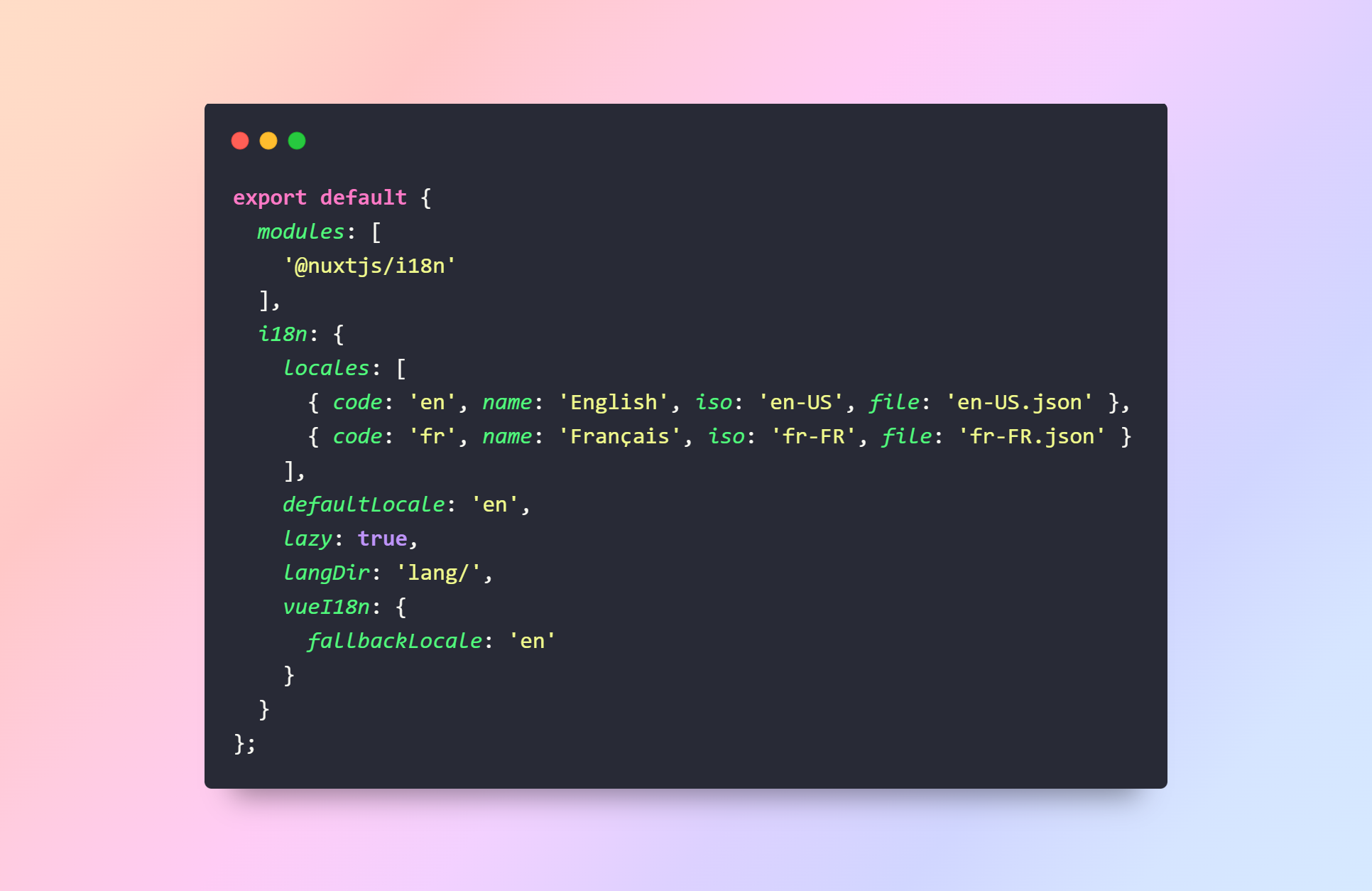
2. Create Language Files: Just chuck the language files into the lang directory provided.
3. Using Translations: When the lazy loading option is activated, you should be able to see our translations being loaded as per request to change language by your user.
Using Third-Party Translation Services
The provision of third-party translation services can help in automation and accelerate progress for bigger projects.
1. Integrate with Translation Management Systems (TMS): From translating content in Translation Management Systems (TMS) to integrated services such as Transifex, Phrase or developing a robust solution like Lokalise. Translation file upload can be automated for these through APIs provided by the platforms.
2. Example Integration with Lokalise:
- Install Lokalise CLI:
npm install -g lokalize
- Download Translations:
lokalise2 download --token <your-api-token> --project-id <your-project-id> --format json --export-empty-as skip --output lang
- Upload Translations:
lokalize2 upload --token <your-api-token> --project-id <your-project-id> --lang-iso en --file lang/en-US.json --tags 'web'
- Automate with npm Scripts: Add scripts to your package.json to automate the download and upload process.
3. Using Translation API: Some services offer real-time translation, like Google Translate or Microsoft Translator. That functions well for dynamic content but is much more limited and expensive.
Implementing Language Switchers
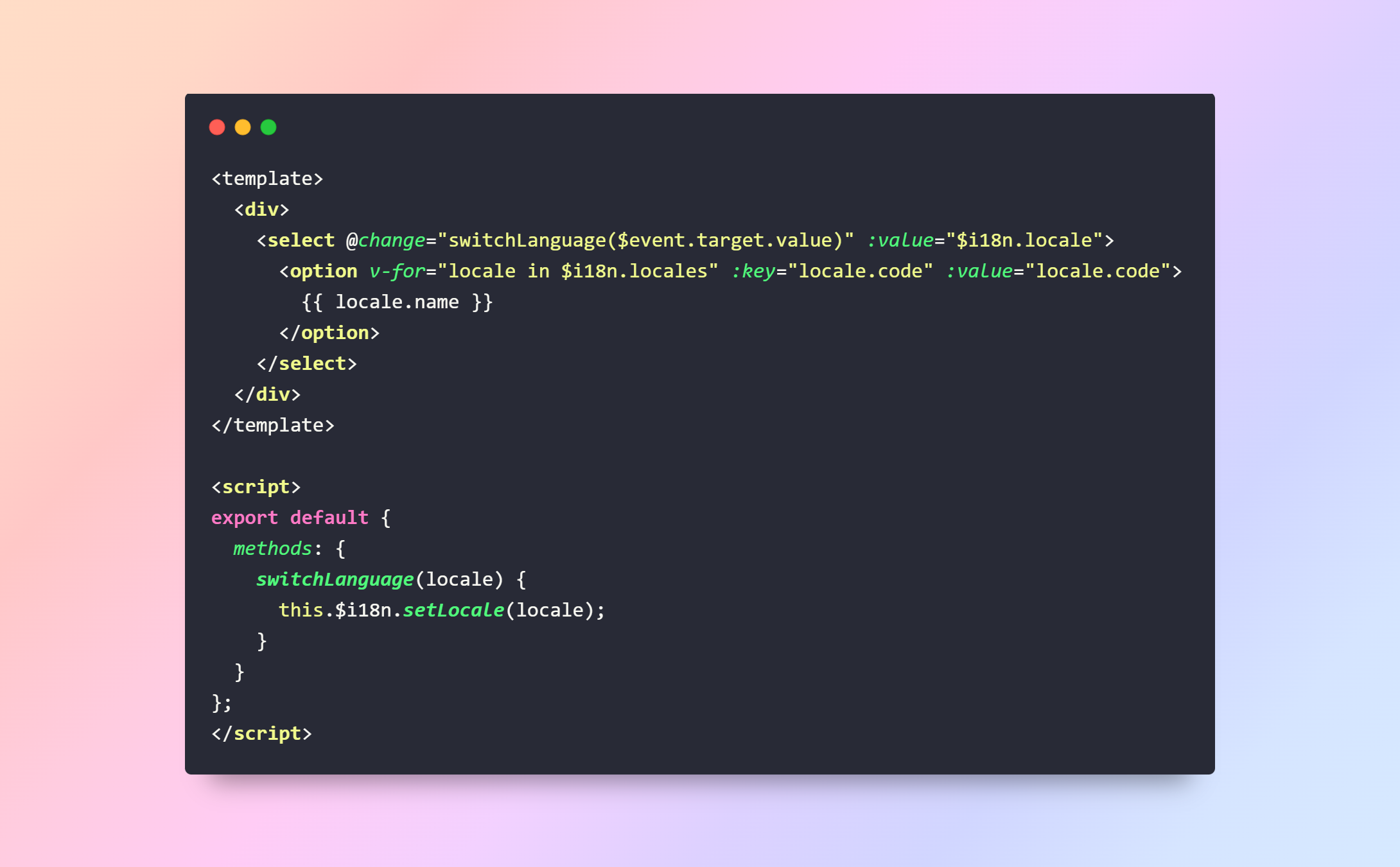
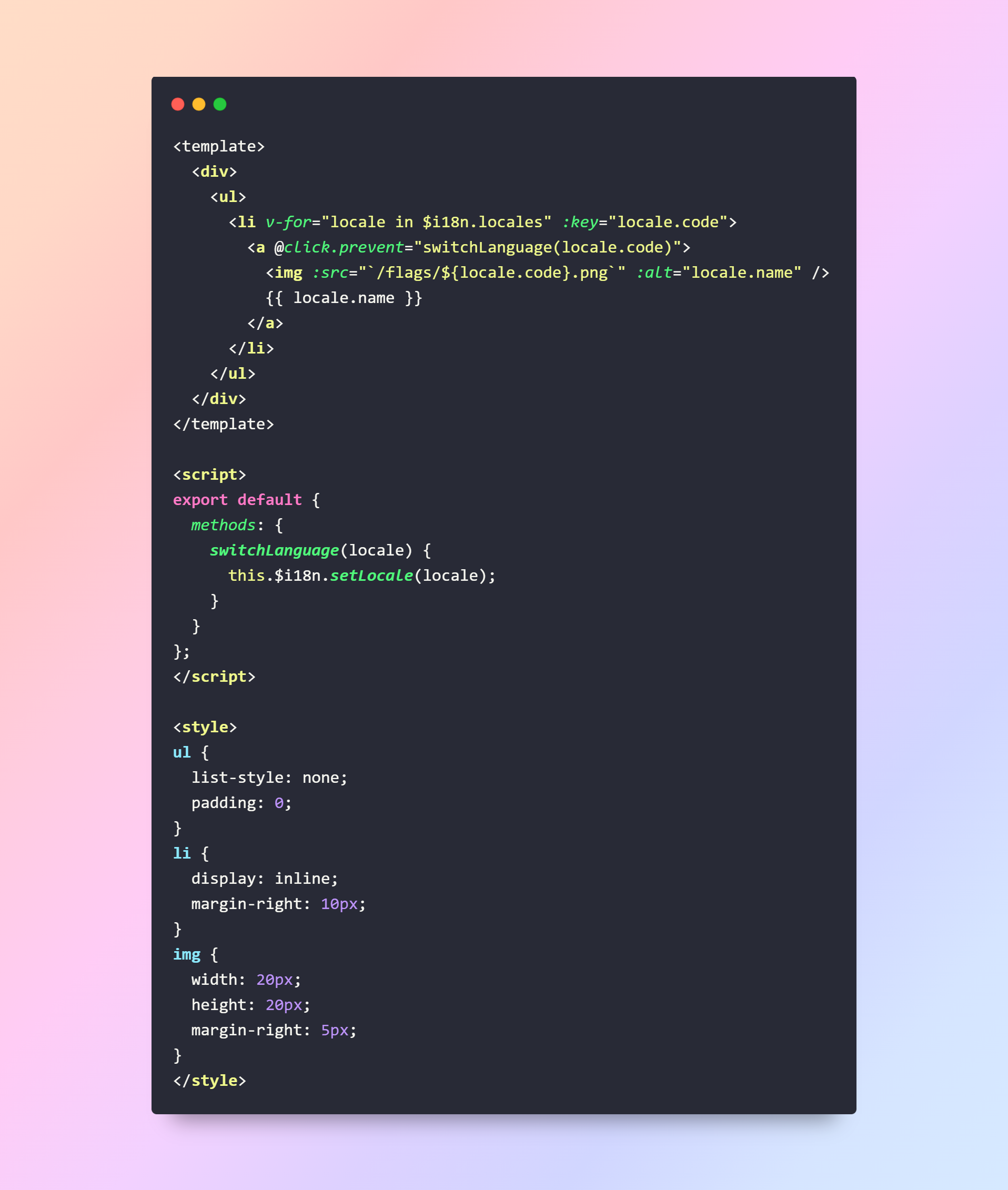
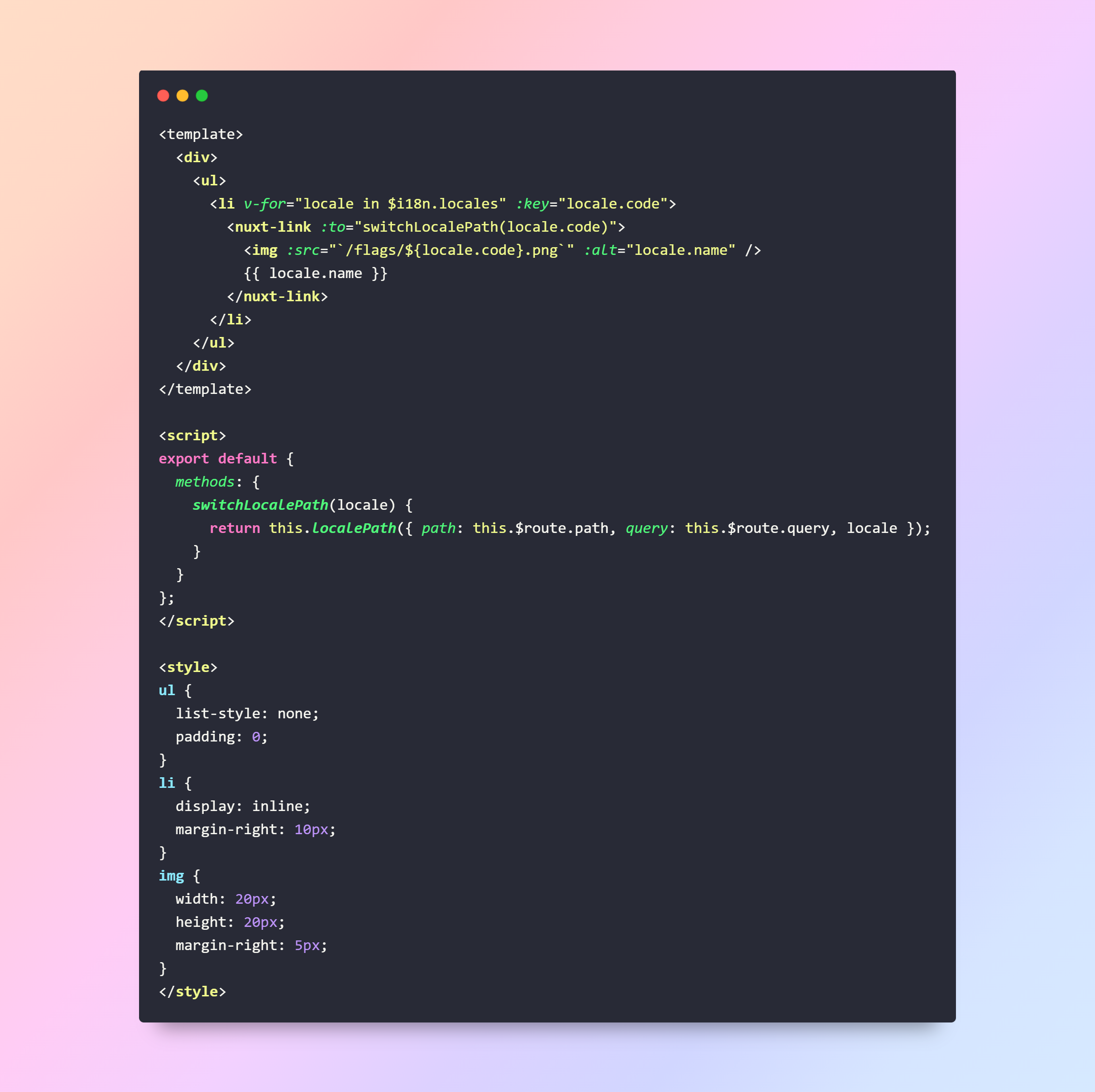
A language switcher allows users to change the language of the website easily.
1. Basic Language Switcher:
2. Language Switcher with Flags:
3. Syncing with URL: To make the language switcher change the URL as well, use Nuxt's router and i18n settings.
Conclusion
This guide only covers more advanced topics of building a multilingual application with Nuxt. js and the nuxt-i18n module. Key Points: Recap
1. Handling Pluralization:
- $tc Function: Allows you to handle plural forms and context-based strings, so the text displayed updates based on quantity.
2. Formatting dates and numbers:
- $d and $n Functions: Provide localized dates, time-long versions, or epochs in conjunction with numbers for locale-specific formats.
3. Translations for Dynamic Content:
- Function: Helpful feature to check whether translation keys are available (or not) + provide a friendlier way for dynamic content handling so that the application won't break whatever some translations aren't included during development.
These are advanced topics and if you master them, your multilingual Nuxt will be more flexible and fun for the end user. js applications. With these pluralization, localized formatting, and dynamic content checks in place, you will have a solid basis for creating applications that need to serve beyond an English-speaking audience.
As you build and iterate on your multilingual websites, why not keep an eye out for new strides being made in localization and internationalization so that your applications stay fresh but, above all, user-friendly?
In short, what you need for your multilingual Nuxt is better performance and scalability by using lazy loading, a third-party translation solution, and a more intuitive language switcher.
Author

Hemanshu Vadoariya
My name is Hemanshu Vadoariya. I am a content writer and blogger.
Recent blog
.jpg)
Role of DEX Development in Decentralized Finance
Technology | 24-09-2026.jpg)
How to Evaluate Outsourced Link Building Without SEO Risk
SEO | 23-09-2026.jpg)
Optimize Salesforce Data Before Deploying AI Agents
Salesforce | 22-09-2026


