
Fast Talk, Slow Scroll: How Audio Speed Changes Hack Attention Spans
- By Celina Anderson
- 25-08-2025
- Technology
If the initial second of your video doesn't receive a double-tap, you have lost the viewer. Platforms are rewarding immediacy, and among the quickest levers to command attention is playing with tempo. An audio speed changer is a small production trick that can turn meandering intros into electric hooks, or intensify drama by stretching a single line until it hangs heavy in the ear.
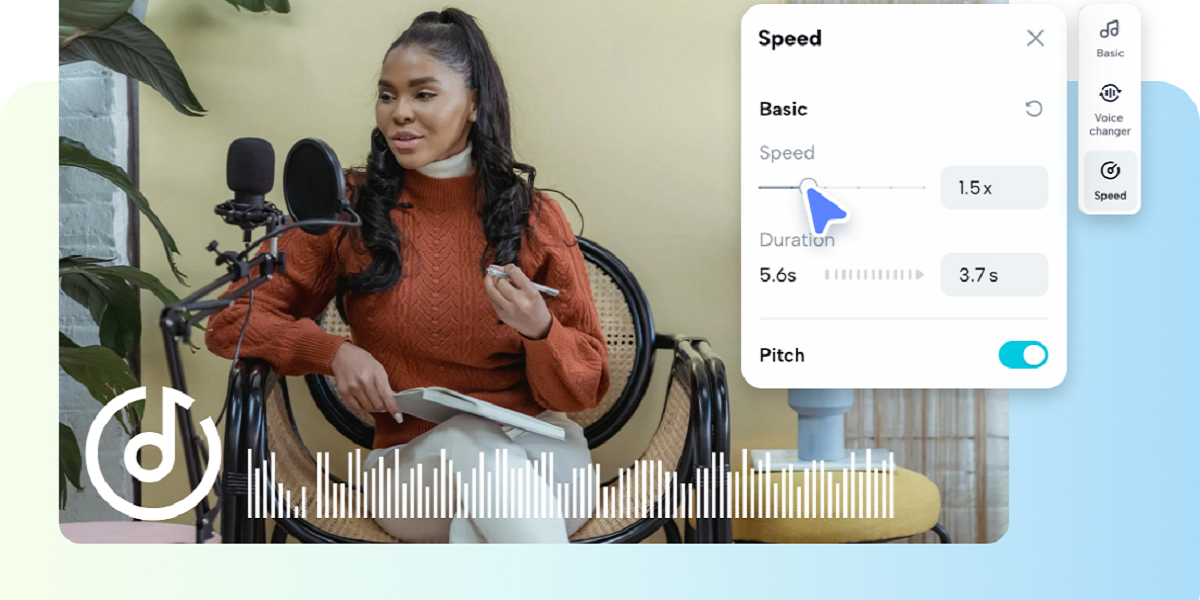
Use it wisely and you transform passive skimmers into engaging listeners in the blink of an eye. Pippit makes it easy to experiment with tempo, so you can try quick intros and slow reveals without reshooting.
This post is interactive and lighthearted. We will illustrate why tempo is important psychologically, how to select when to accelerate or decelerate, useful creative recipes you can apply this week, and a straightforward workflow that matches audio edits with snappy visuals so each second earns its keep.
The attention economy loves tempo
Humans scan feeds like the wind. A voice that travels too slowly gets glossed over. A voice that travels too quickly can be unintelligible. The trick is in the middle: deliberate speed shifts that convey energy, experience, or feeling in an instant.
Fast audio signals competence and urgency. Accelerating a courteous how-to opening by 10 to 20 percent alerts listeners that the material will be productive. Slow audio signals' weight and significance. Deliberately slowing down an investigative sentence for dramatic effect causes listeners to lean in because it sounds meaningful.
Quick psychology: why tempo changes capture the brain
Our brains respond to surprise timing. A sudden change of tempo causes a prediction error — the viewer anticipates one rhythm but hears another — and that discrepancy incites attention. Brief, startling accelerations may cause pleasure or humor. Briefly, judicious decelerations produce concentration and a feeling of importance. Employ these effects with intention and restraint for maximum power.
When to pick up speed: the sprint recipes
Accelerating audio is not merely quick speech. It is about cramming greater potential into the initial seconds. Experiment with these sprint recipes.
- Breezy introductions: accelerate the initial line of a guide by 15 percent so the hook hits right away.
- Montage voiceover: tighten up pacing through rapid cuts to boost perceived energy.
- Snack-sized summaries: produce sped-up versions for society where audiences crave the summary quickly.
Remember intelligibility. Incremental increases in tempo usually don't register, but make material seem quicker. Bigger leaps become stylistic decisions that must be tested.
Three easy steps to change the tempo of your audio using Pippit
Step 1: Import your audio file
Experiment audio speed changer free with Pippit. To begin, go to Video generator and hit Video editor. In the new window of the interface, click on the Media tab. You can share the URL or upload your audio file straight from your device or cloud storage.
Step 2: Modify the audio's pace and pitch
Pippit's audio pitch and speed changer allows you to change pitch and speed with easy-to-use sliders. Playback can be sped up or slowed down without affecting pitch, ensuring excellent results. To improve professional quality, preview the modifications and use effects like fade-ins or fade-outs.
Step 3: Share your refined audio
Listen to the finished audio once you're happy with your modifications to make sure every modification lives up to your standards. For instant usage in podcasts, movies, or advertising campaigns, export the song in the format and resolution of your choice.
Combining tempo with visuals for greatest pull
Tempo alone can grab attention, but visual pairing enhances it. Quick visuals with accelerated voice-over sound imperative; glacial close-ups with a slow voice sound like they're shot on film. Employ micro-edits to sync tempo and movement.
- For sped audio: shorten length of shots, accelerate motion, rhythmic cuts.
- For slowed audio: linger on faces, give reaction frames room to breathe, eliminate visual clutter.
When a tempo edit for some reason creates a timing conflict, a fast trim in the timeline using an online video trimmer will sync visual hits with audio peaks and have the entire package feel seamless.
Practical tips for maintaining voice quality
Changing speed can cause artifacts. Remember these tips.
- Small steps win: change speed in small steps; 5 to 15 percent usually provides the best compromise between tempo and clarity.
- Maintain pitch: use effects that isolate pitch from speed so voices still sound natural.
- Preview on phones: listen back on smartphones and in noisy settings to check for understanding.
These checks avoid unintended chipmunk voices or tinny slowdowns that erode credibility.
Ethical and accessibility considerations
Keep in mind that changing tempo impacts accessibility. Individuals with hearing differences or non-native speakers might require clearer speech. Always caption and include slower versions in accessibility playlists. Utilize tempo to support, rather than eliminate, understanding.
Pairing tempo with visual fixes
Occasionally a tempo change reveals visual edges. A sped-up line can reveal a distracting background, or a slow reveal can reveal an unflattering frame. Small adjustments save reshoots. Swap a frame with a better angle, crop to tighten focus, or make a minor photo background change to keep eyes on the subject and not on a stray object.
Measuring success: what to track
Tempo is a test. Monitor these metrics to gauge impact.
- First 3-second retention to determine if tempo captures attention.
- Completion rate to gauge sustained interest.
- Click-throughs and saves to know downstream action.
Use those insights to optimize how aggressive or subtle your speed edits need to be.
Playful experiments that build brand rhythm
Make tempo your brand tool. Adopt a stable voice speed for trailers and another for tutorials so viewers learn to anticipate a certain tempo from your formats. Tempo reliability becomes your brand hallmark.
Final mix: tempo as a creative lever
Audio speed adjustment is perhaps the most underutilized but strongest lever available in short-form content production. It is free, no reshoot required, and can profoundly alter perception in the first heartbeat of a clip.
Conduct small, quantifiable experiments and combine them with sharp-cut visual edits to convert fast chat into slow scrolls. Pippit enables you to move quickly, export versions, and publish winners.
Sign up for Pippit today and find out which tempo is your signature!
Author

Celina Anderson
This blog is published by Celina Anderson.
Recent blog
.jpg)
Role of DEX Development in Decentralized Finance
Technology | 24-09-2026.jpg)
How to Evaluate Outsourced Link Building Without SEO Risk
SEO | 23-09-2026.jpg)
Optimize Salesforce Data Before Deploying AI Agents
Salesforce | 22-09-2026


